
SVG图制作模板和说明
mermaid制图美化技巧实践
mermaid制图美化效果对比
为适应AI时代的代码制图,近期我试图修改完善了一个家庭网络的图,感觉不错。家庭原图为: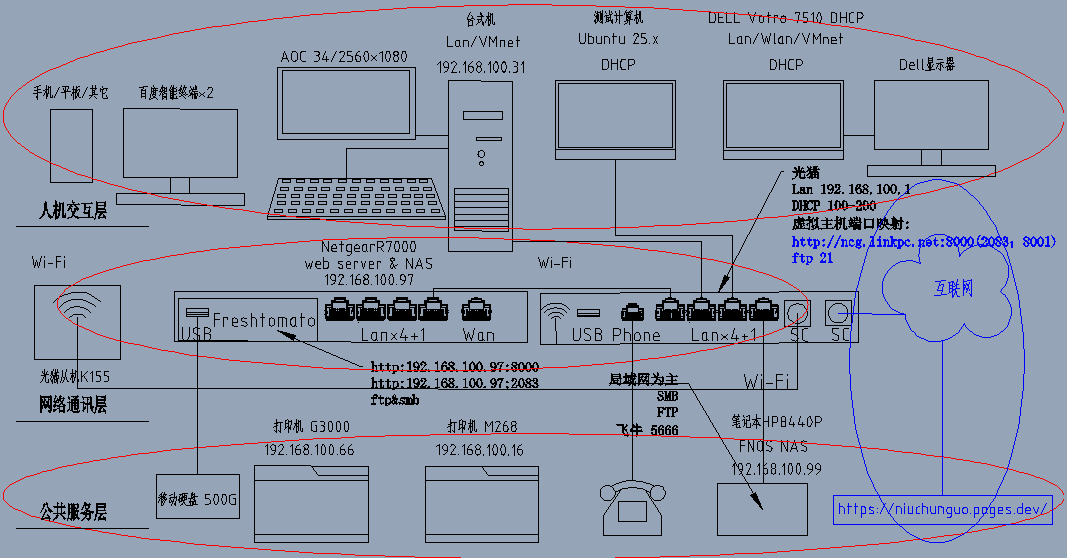
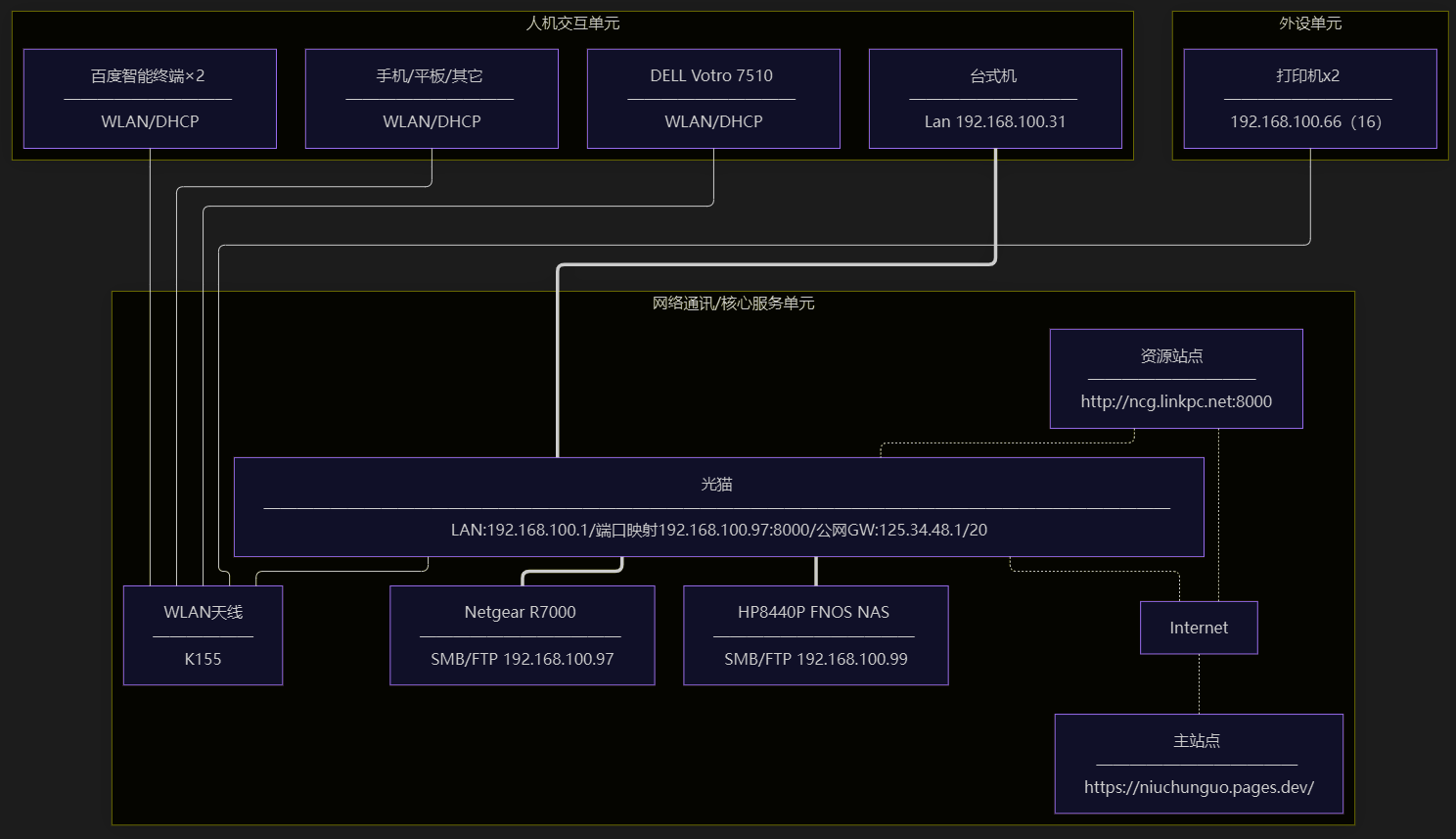
mermaid制图技巧实践
工具环境约定:使用mermaid代码规则,Obsidian+Mermaid ELK Renderer插件。
豆包给出初始代码,在没有Mermaid ELK Renderer插件的情况下,布局比较乱,弯曲连线规则性差。安装Mermaid ELK Renderer插件后变成相对规则,但是不好控制位置和盒子大小。
后来经过测试,使用中文字符“——”做分割线能有效控制盒子的宽度统一。横线上面是主题名,下面是描述。对比没有插件的下面图片,是不是美观多了!
原图1代码示例
```mermaid
---
config:
  layout: elk
  elk:
    minWidth:2200
    spacing:80
    nodeSpacing:50
    elk.direction:DOWN
---
flowchart-elk TD
subgraph SVC["外设单元"]
    direction LR
    P1[打印机x2 —————————— 192.168.100.66(16)]
end
subgraph H["人机交互单元"]
    direction LR
    A[百度智能终端×2 —————————— WLAN/DHCP]
    B[手机/平板/其它 —————————— WLAN/DHCP]
    C[台式机 —————————— Lan 192.168.100.31]
    D[DELL Votro 7510 —————————— WLAN/DHCP]
end
subgraph NET["网络通讯/核心服务单元"]
    direction LR
    GM["光猫 —————————————————————————————————————————————————————— LAN:192.168.100.1/端口映射192.168.100.97:8000/公网GW:125.34.48.1/20"]
  VP["资源站点  ——————————  http://ncg.linkpc.net:8000"]
    R7000["Netgear R7000 ———————————— SMB/FTP 192.168.100.97"]
    NAS["HP8440P FNOS NAS ———————————— SMB/FTP 192.168.100.99"]
    GM --- K155["WLAN天线<br> ——————<br>  K155"]
   GM -.- Internet
   Internet -.- MP[" 主站点 ———————————— https://niuchunguo.pages.dev/ "]
end
VP -.- Internet
VP -.- GM
A --- K155
B --- K155
C === GM
D --- K155
GM === R7000
GM === NAS
P1 --- K155
H ~~~ NET
NET ~~~ SVC
```
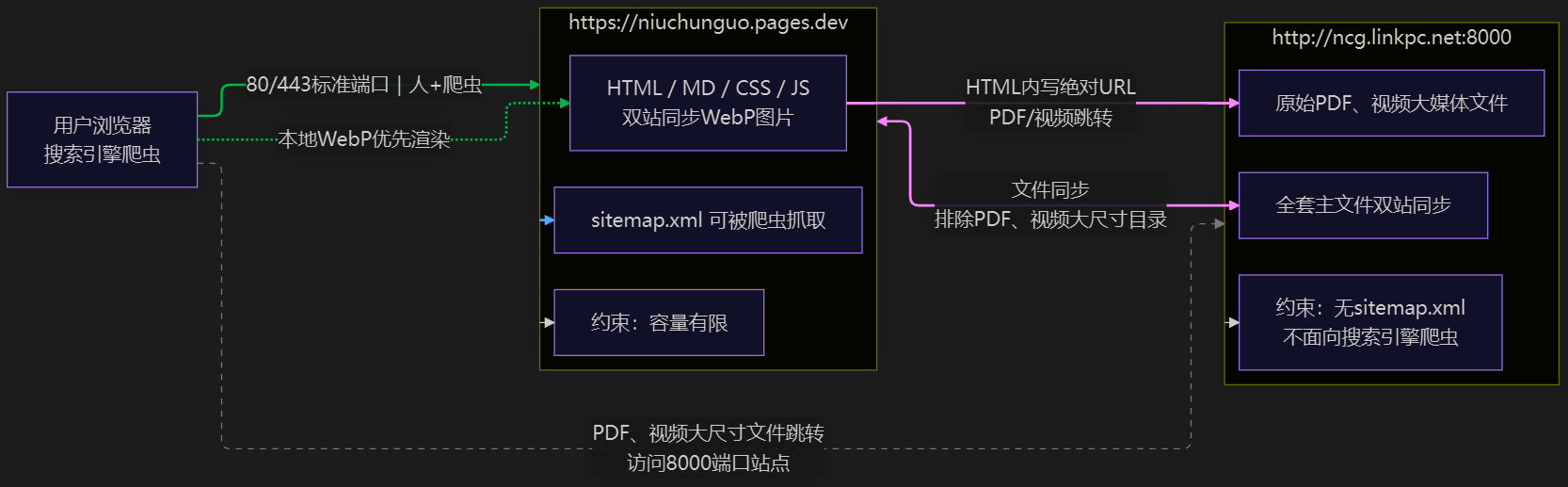
原图2代码示例
```mermaid
%%{init: { 'layout':'elk' }}%%
flowchart LR
    A["用户浏览器<br/>搜索引擎爬虫"]

    subgraph pagesdev ["https://niuchunguo.pages.dev"]
        B["HTML / MD / CSS / JS<br/>双站同步WebP图片"]
        C["sitemap.xml 可被爬虫抓取"]
        D["约束:容量有限"]
    end

    subgraph linkpc ["http://ncg.linkpc.net:8000"]
        E["原始PDF、视频大媒体文件"]
        F["全套主文件双站同步"]
        G["约束:无sitemap.xml<br/>不面向搜索引擎爬虫"]
    end

    A -- 80/443标准端口|人+爬虫 --> pagesdev
    A -. 本地WebP优先渲染 .-> B
    A -.PDF、视频大尺寸文件跳转<br/>访问8000端口站点.-> linkpc
    pagesdev <-- 文件同步<br/>排除PDF、视频大尺寸目录 --> F
    B -- HTML内写绝对URL<br/>PDF/视频跳转 --> E
    pagesdev --> C
    pagesdev --> D
    linkpc --> G

    linkStyle 0 stroke:#00aa55,stroke-width:2px
    linkStyle 1 stroke:#00aa55,stroke-width:2px
    linkStyle 2 stroke:#888888,stroke-dasharray:5 5
    linkStyle 3 stroke:#9933bb,stroke-width:2px
    linkStyle 4 stroke:#9933bb,stroke-width:2px
    linkStyle 5 stroke:#2266dd,stroke-width:2px

```
注意插件的关键点
Obsidian 插件是跟着仓库(Vault)走,不是全局!每个库根目录下面隐藏文件夹 `.obsidian`,插件、开关、配置全部存在**当前库内部**,不同仓库完全隔离。
mermaid制图主要避坑
SVG图制作空格敏感,典型实践是AI给出的代码,要先粘贴在记事本,再考出来,在粘贴到md文件编辑器中。 代码头尾必须是如下格式:
最小完整示例(直接复制测试)
```mermaid
flowchart LR
    %%样式放最前面
    classDef okStyle fill:#d5e8d4,stroke:#288828,stroke‑width:1px
    classDef errorStyle fill:#ffcccc,stroke:#dd0000,stroke‑width:2px

    start(开始) --> judge{条件判断}
    judge --是--> ok[执行逻辑A]:::okStyle
    judge --否--> no[执行逻辑B]:::errorStyle
```
竖版图
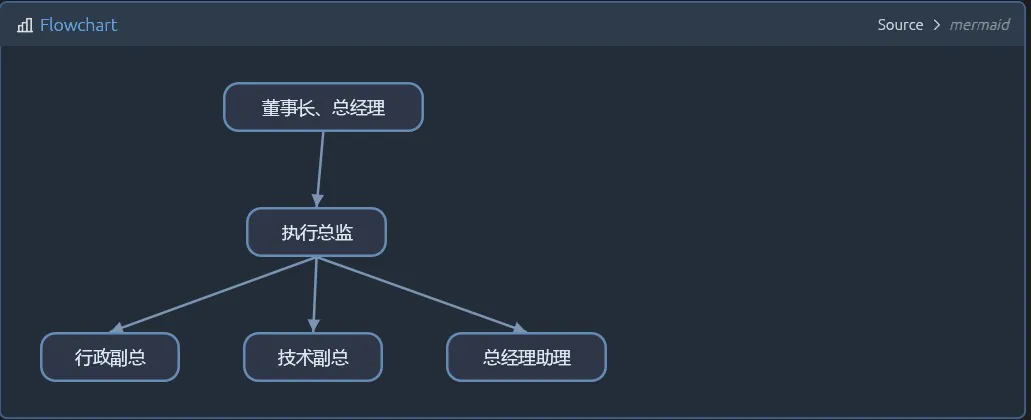
flowchart TB
    %% 定义圆角样式
   classDef roundBox rounded:true,fill:#2a2a2a,stroke:#666666,color:#ffffff

    CEO(董事长、总经理):::roundBox
    Tech(执行总监):::roundBox
    Admin(行政副总):::roundBox
    Front(技术副总):::roundBox
    Back(总经理助理):::roundBox

    %% 直角连线,flowchart默认自动直角布线
    CEO --> Tech
    Tech--> Admin
    Tech --> Front
    Tech --> Back
横版图
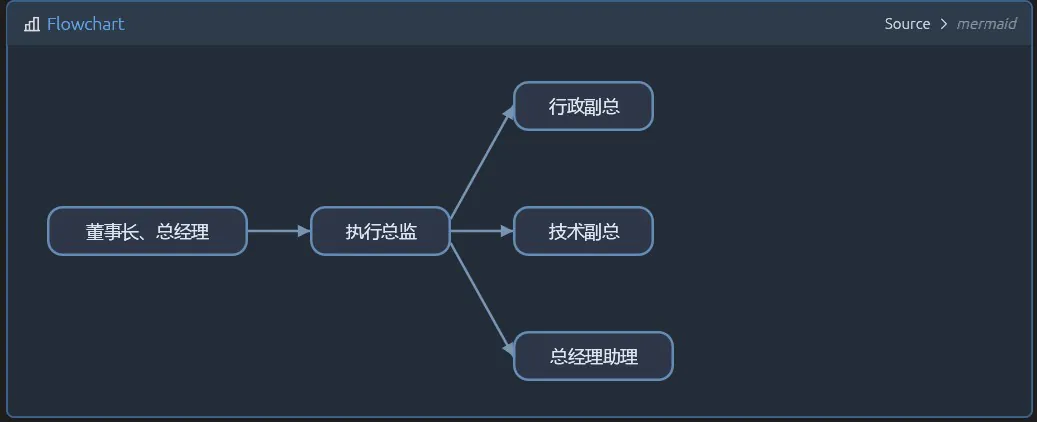
flowchart LR
    %% 定义圆角样式
classDef roundBox rounded:true,fill:#2a2a2a,stroke:#666666,color:#ffffff

    CEO(董事长、总经理):::roundBox
    Tech(执行总监):::roundBox
    Admin(行政副总):::roundBox
    Front(技术副总):::roundBox
    Back(总经理助理):::roundBox

    %% 直角连线,flowchart默认自动直角布线
    CEO --> Tech
    Tech--> Admin
    Tech --> Front
    Tech --> Back
框架SVG图]
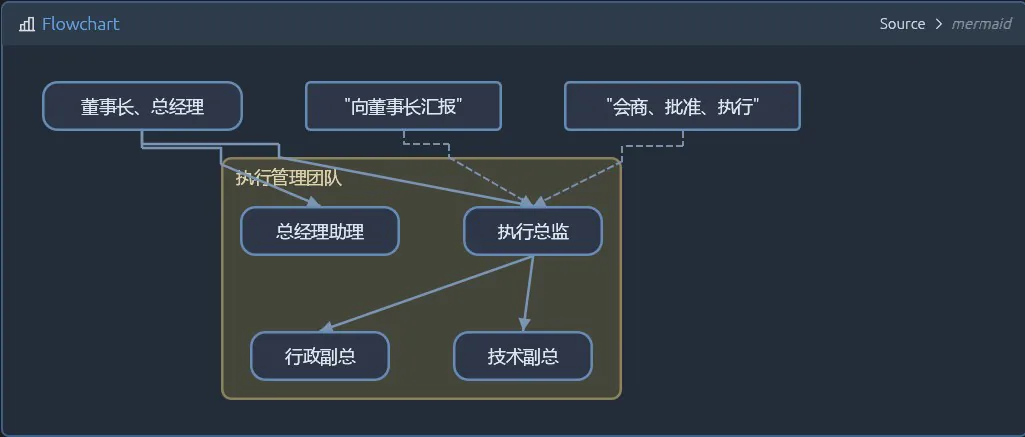
flowchart TB
classDef roundBox rounded:true,fill:#2a2a2a,stroke:#666666,color:#ffffff
    classDef floatText fill:none,stroke:none

    CEO(董事长、总经理):::roundBox

    subgraph 执行管理团队
        Tech(执行总监):::roundBox
        Admin(行政副总):::roundBox
        Front(技术副总):::roundBox
        Back(总经理助理):::roundBox
    end

    CEO --> Tech
    Tech --> Admin
    Tech --> Front
    CEO --> Back

    note\_right\["向董事长汇报"]:::floatText
    note\_bottom\["会商、批准、执行"]:::floatText

    note\_right -.-> Tech
    note\_bottom -.-> Tech